
Using the Tyre Workspace
Open Tyre Workspace to see the tyres and rims fitted to an Asset.
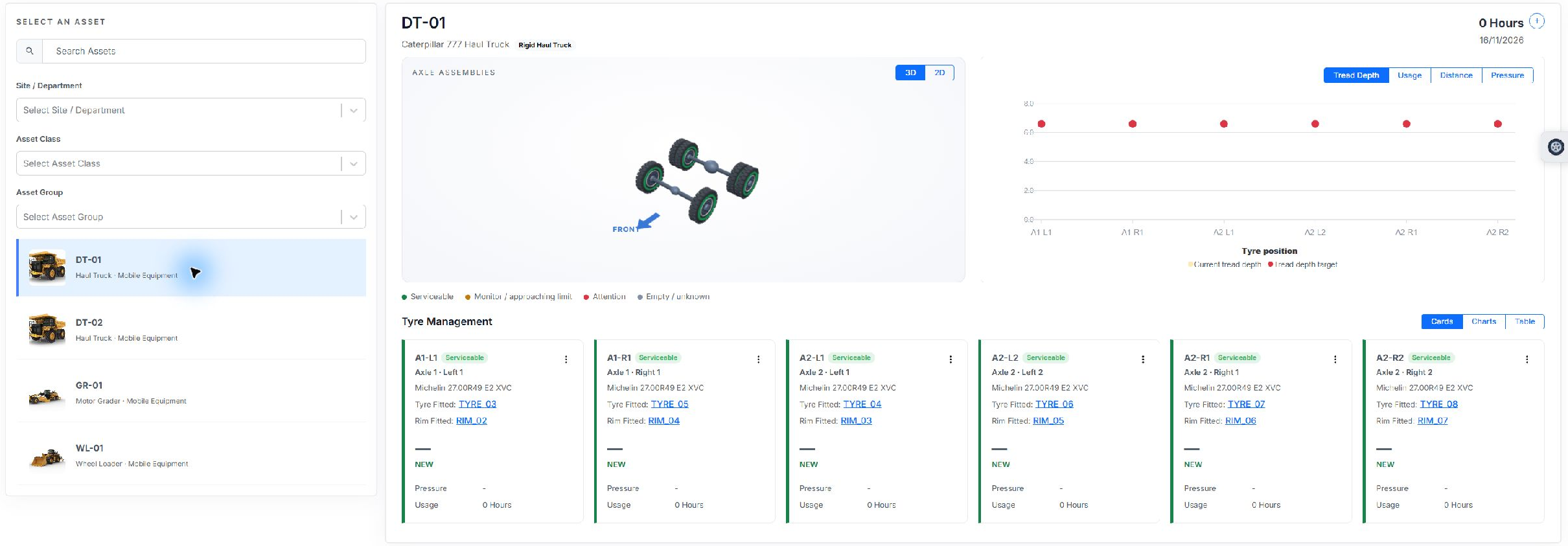
- Find the Asset using Search Assets, Site / Department, Asset Class or Asset Group.
- Select the Asset. Its layout shows the configured axle positions and fitted components.
- Switch between 3D and 2D, or use Cards, Charts and Table to review positions.
- Select a tyre or rim serial number to inspect that component. Use the position's actions menu for a change.
- Open Available Tyres & Rims using the wheel handle on the right to review compatible components.
The available-components panel uses the Asset's layout, allowed sizes, meter units and department access. A component shown as fitted elsewhere must be removed before transfer. Missing warehouse assignments can prevent off-Asset stock appearing.
Your administrator must enable Tyre Management and grant the relevant page and action permissions. A missing action may reflect access or the component's current state.