
Changing or removing a tyre
Open Tyre Workspace, select the Asset and locate the position.
- Open the position's actions menu and choose Change Tyre. Use Change Wheel (Tyre + Rim) when both components are changing.
- Check the Asset, position and Transaction Date and Time.
- Under Tyre to Remove, confirm the fitted tyre, choose Tyre Condition and Removal Reason, and provide required notes or evidence.
- Select Replacement Tyre. For removal without replacement, turn on Removal Only.
- Check both sides of the change and select Save only when the physical work and recorded details agree.
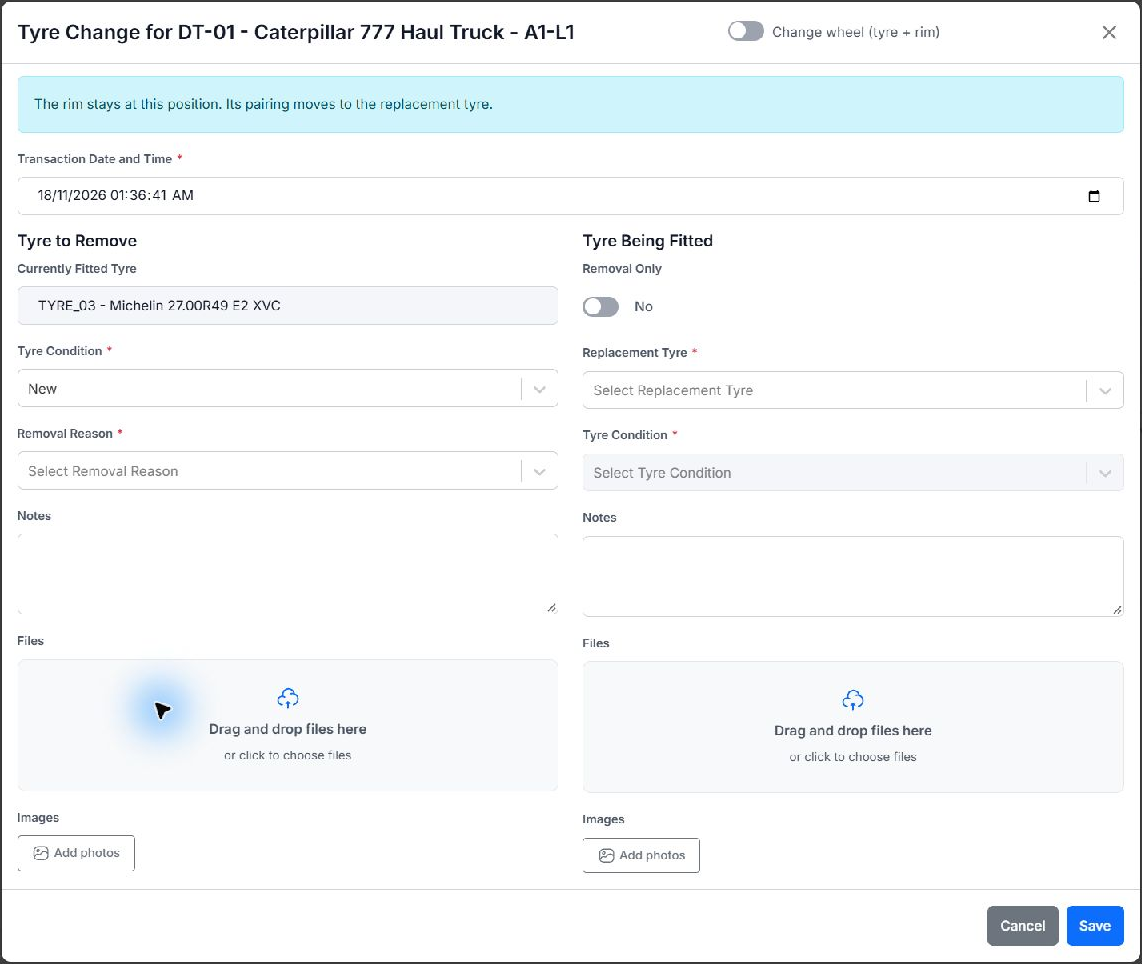
A tyre-only change leaves the rim at the position and moves its pairing to the replacement tyre. A complete-wheel removal preserves the tyre/rim pair off the Asset. Empty-position fitting uses the available fit action rather than removing a component that is not there.
Fitment checks include allowed sizes, compatible meters, warehouse department access and existing pairings. A component already fitted elsewhere is not available for immediate transfer. Resolve validation messages instead of changing reference data merely to bypass them.